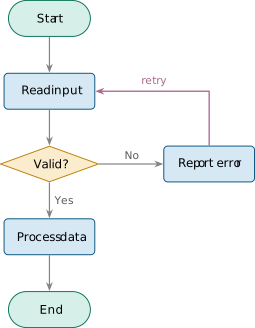
Flowchart (decision + loop)
Standard flowchart: terminal pills (start/end), process rectangles, a decision diamond with Yes/No branches, and a retry loop. Parametric spacing and labels.
This template ships an edit contract (in its meta.json) that the repo-wide using-opentikz skill reads to edit it reliably — the parameters and safe operations are listed below.
| id | flowchart |
|---|---|
| type | template |
| domain | general |
| requires | tikz, arrows.meta, positioning, shapes.geometric, shapes.misc |
| license | CC0-1.0 |
| author | OpenTikZ contributors |
template.tex
\documentclass[border=8pt]{standalone}

% --- packages (mirror these in template.meta.json "requires") ---
\usepackage{tikz}
\usetikzlibrary{positioning, arrows.meta, shapes.geometric, shapes.misc}

% --- palette (canonical source: reference/color-palettes/color-palettes.md; light variant) ---
\definecolor{otblue}{HTML}{0072B2}
\definecolor{otorange}{HTML}{E69F00}
\definecolor{otteal}{HTML}{009E73}
\definecolor{otpurple}{HTML}{CC79A7}
\definecolor{otgray}{HTML}{5A5A5A}

\begin{document}
% ==== parameters (edit these) ============================================
\def\rowsep{0.95}   % vertical gap between steps (cm)
\def\boxminw{2.4}   % minimum process/terminal width (cm)
\def\boxminh{0.95}  % minimum box height (cm)
% labels
\def\startlabel{Start}
\def\readlabel{Read input}
\def\checklabel{Valid?}
\def\proclabel{Process data}
\def\endlabel{End}
\def\errorlabel{Report error}
\def\yeslabel{Yes}
\def\nolabel{No}
\def\looplabel{retry}
% =========================================================================

\begin{tikzpicture}[
    node distance=\rowsep cm,
    >={Stealth[length=2.4mm]},
    base/.style={
      line width=0.7pt, align=center, font=\sffamily\small,
      minimum width=\boxminw cm, minimum height=\boxminh cm,
    },
    terminal/.style={base, shape=rounded rectangle, draw=otteal!70!black, fill=otteal!16},
    process/.style={base, rounded corners=3pt, draw=otblue!70!black, fill=otblue!16},
    decision/.style={base, shape=diamond, aspect=2.2, inner sep=1pt,
      draw=otorange!80!black, fill=otorange!20, minimum width=2.6cm},
    flow/.style={draw=otgray!75, line width=0.9pt, ->},
    loop/.style={draw=otpurple!85!black, line width=1.0pt, ->},
    elabel/.style={font=\sffamily\footnotesize, text=otgray},
  ]

  % --- main vertical spine ---
  \node[terminal] (start) {\startlabel};
  \node[process,  below=of start] (read)  {\readlabel};
  \node[decision, below=of read]  (check) {\checklabel};
  \node[process,  below=of check] (proc)  {\proclabel};
  \node[terminal, below=of proc]  (end)   {\endlabel};
  % --- error branch to the right of the decision ---
  \node[process, right=1.7cm of check] (error) {\errorlabel};

  % --- flow ---
  \draw[flow] (start) -- (read);
  \draw[flow] (read)  -- (check);
  \draw[flow] (check) -- (proc) node[midway, right, elabel] {\yeslabel};
  \draw[flow] (proc)  -- (end);
  \draw[flow] (check) -- (error) node[midway, above, elabel] {\nolabel};
  % --- retry loop: error back up to read ---
  \draw[loop] (error.north) |- (read.east)
    node[pos=0.75, above, font=\sffamily\footnotesize, text=otpurple!85!black] {\looplabel};

\end{tikzpicture}
\end{document}
Edit contract — how the AI edits this template
using-opentikz skill →Parameters & safe edit operations
Parameters
\rowsep | vertical gap between steps (tikz node distance) default 0.95 |
\boxminw | minimum process/terminal width default 2.4 |
\boxminh | minimum box height default 0.95 |
\startlabel | start terminal label |
\readlabel | first process label |
\checklabel | decision diamond label |
\proclabel | main process label |
\endlabel | end terminal label |
\errorlabel | error-branch process label |
\yeslabel | decision Yes-edge label |
\nolabel | decision No-edge label |
\looplabel | retry loop edge label |
Node naming
fixed semantic node names: (start) (read) (check) (proc) (end) (error); give any new node a clear semantic name
Operations
rename-step— edit the matching label macroadd-process-step— insert a process node below=of the previous one and re-point the surrounding flow arrowsadd-decision— add a decision node and route its two outgoing flow arrows, labelling each branchchange-shape— swap a node's style: process<->decision<->terminal (give a decision a ? label)add-io-step— use a trapezium (slanted box) for an I/O step; shapes.geometric is already loadedrecolor— change the palette name in the relevant style; never a hex/stock color
Use it
The file compiles on its own (\documentclass{standalone}).
Drop it into your project and \input it, or copy the
tikzpicture into your figure. Colours come from the shared
palette defined in the preamble — edit those named colours, not raw hex.
Graphic content is CC0 1.0 (public domain) — reuse freely, no attribution required.