template
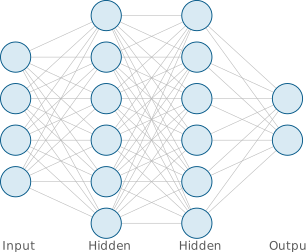
Feed-forward neural network
Parametric fully-connected feed-forward neural network. Layer count and neurons-per-layer are set by a single list at the top of the file.
This template ships an edit contract (in its meta.json) that the repo-wide using-opentikz skill reads to edit it reliably — the parameters and safe operations are listed below.
| id | neural-net |
|---|---|
| type | template |
| domain | ml |
| venue | NeurIPS, ICML, CVPR |
| requires | tikz |
| license | CC0-1.0 |
| author | OpenTikZ contributors |
template.tex
\documentclass[border=6pt]{standalone}

% --- packages (mirror these in template.meta.json "requires") ---
\usepackage{tikz}
% Edges are drawn on a background layer so they sit behind the neurons.
\pgfdeclarelayer{edges}
\pgfsetlayers{edges,main}

% --- palette (canonical source: reference/color-palettes/color-palettes.md; light variant) ---
\definecolor{otblue}{HTML}{0072B2}
\definecolor{otorange}{HTML}{E69F00}
\definecolor{otteal}{HTML}{009E73}
\definecolor{otpurple}{HTML}{CC79A7}
\definecolor{otgray}{HTML}{5A5A5A}

\begin{document}
% ==== parameters (edit these) ============================================
% Neurons per layer, in order. The number of entries IS the number of layers.
\def\layersizes{4,6,6,2}
% One label per layer (keep this list the same length as \layersizes).
\def\layerlabels{Input,Hidden,Hidden,Output}
\def\layersep{2.4}    % horizontal distance between layers (cm)
\def\neuronsep{1.1}   % vertical distance between neurons within a layer (cm)
\def\neuronsize{0.8}  % neuron diameter (cm)
% =========================================================================

\begin{tikzpicture}[
    neuron/.style={
      circle, draw=otblue!75!black, line width=0.7pt,
      fill=otblue!15, minimum size=\neuronsize cm, inner sep=0pt,
    },
    edge/.style={draw=otgray!45, line width=0.4pt},
    layerlabel/.style={font=\sffamily\small, text=otgray, anchor=base},
  ]

  % y of the label row: just below the lowest neuron of the largest layer.
  \pgfmathsetmacro{\maxsize}{0}
  \foreach \s in \layersizes {%
    \pgfmathsetmacro{\maxsize}{max(\maxsize,\s)}\global\let\maxsize\maxsize}
  \pgfmathsetmacro{\labely}{-((\maxsize-1)/2)*\neuronsep-0.7}

  % Place neurons layer by layer; names are L<layer>-<neuron>. Each layer is
  % vertically centred on y=0. After a layer is placed, fully connect it to the
  % previous one (edges go on the background layer).
  \foreach \size [count=\layer, remember=\size as \prevsize (initially 0)] in \layersizes {
    \pgfmathsetmacro{\x}{\layer*\layersep}
    \foreach \n in {1,...,\size} {
      \pgfmathsetmacro{\y}{(\n-(\size+1)/2)*\neuronsep}
      \node[neuron] (L\layer-\n) at (\x,\y) {};
    }
    \ifnum\layer>1\relax
      \pgfmathtruncatemacro{\prevlayer}{\layer-1}
      \begin{pgfonlayer}{edges}
        \foreach \p in {1,...,\prevsize} {
          \foreach \q in {1,...,\size} {
            \draw[edge] (L\prevlayer-\p) -- (L\layer-\q);
          }
        }
      \end{pgfonlayer}
    \fi
  }

  % Layer labels in an aligned row beneath the network.
  \foreach \lab [count=\layer] in \layerlabels {
    \pgfmathsetmacro{\x}{\layer*\layersep}
    \node[layerlabel] at (\x,\labely) {\lab};
  }

\end{tikzpicture}
\end{document}
Edit contract — how the AI edits this template
using-opentikz skill →Parameters & safe edit operations
Parameters
\layersizes | neuron count per layer; the number of entries is the number of layers (layer 1 is leftmost) default {4,6,6,2} |
\layerlabels | one label per layer default {Input,Hidden,Hidden,Output} |
\layersep | horizontal distance between layers default 2.4 |
\neuronsep | vertical distance between neurons within a layer default 1.1 |
\neuronsize | neuron diameter default 0.8 |
Node naming
L<layer>-<neuron>, both 1-based, e.g. (L1-1), (L2-3)
Operations
add-layer— append a count to \layersizes AND a label to \layerlabels (keep equal length); insert mid-network by adding at the same position in both listsremove-layer— delete one entry from each list at the same positionresize-layer— edit one entry in \layersizes only (the label list is unchanged)recolor— change the palette color name used by the neuron style (and otgray in edge/layerlabel for tints); never a hex or stock colorresize-spacing— \neuronsize for node size, \neuronsep (vertical) and \layersep (horizontal) for spacing
Use it
The file compiles on its own (\documentclass{standalone}).
Drop it into your project and \input it, or copy the
tikzpicture into your figure. Colours come from the shared
palette defined in the preamble — edit those named colours, not raw hex.
Graphic content is CC0 1.0 (public domain) — reuse freely, no attribution required.