Edit figures with AI
OpenTikZ ships one skill,
using-opentikz:
it takes an AI agent from a plain-language request to a finished, compiling figure —
and confirms the ambiguous details with you instead of guessing.
Skills in action
One prompt, one precise edit — across different kinds of change.

“recolor the database orange”
Every teal element switched to otorange — a palette name, never raw hex.
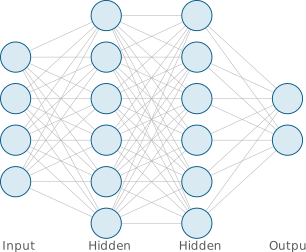
“add a hidden layer”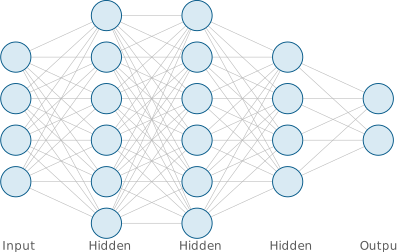
A fourth layer inserted before the output; connections and labels update automatically.
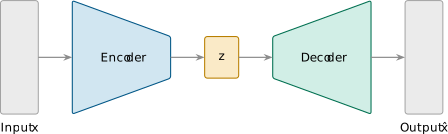
“add a cross-attention block and make it blue”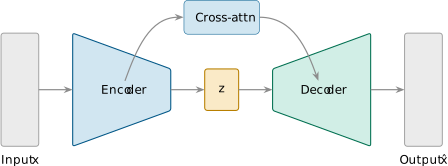
A blue cross-attention block added — the decoder now attends to the encoder (a documented skill op).
How to use it
Point any agent that can read this repo (Claude Code, or an assistant with the files) at the skill, then just describe the change you want.
- Ask in plain language. “Add a cross-attention layer to the encoder-decoder and make it blue”, “recolor the database orange”, “give the net one more hidden layer”. No TikZ required.
- The agent finds the figure. It matches your request against
catalog.jsonand confirms which icon, template, or example to start from. - It edits, then verifies. It applies the change, keeps the figure parametric and palette-correct, and compiles the standalone
.texbefore handing it back — never an uncompiled guess. - You stay in control. On anything material it asks first; on safe defaults (palette, width) it proceeds and tells you what it assumed in one line.
Why it edits each figure accurately
The skill doesn’t hand-parse TikZ and hope. Every template ships a structured edit_contract in its meta.json that tells the agent exactly how that figure is built — so edits land on the right parts.
Named parameters
Counts, sizes, spacing, and labels are driven by a \def block the contract enumerates — so “one more layer” is a parameter change, not a redraw.
Stable node names
A documented naming scheme (e.g. L2-3, (enc)) lets the agent target a specific part and attach new arrows without breaking the layout.
Safe operations & invariants
The contract lists the edits that are known-safe (recolor, add/remove a part, resize) and the rules an edit must never break — guardrails against plausible-but-wrong changes.
One shared palette
Colors are five named palette entries, never inline hex — so a recolor stays consistent and colour-blind-friendly across the whole figure.
The shared conventions it draws on
Beyond each template’s contract, the skill applies the library’s common conventions — so colour, annotations, and layout stay consistent across every figure it touches, not just the one you asked about. These are the references it works from:
Color palettes ↗
The shared, colour-blind-friendly palette it recolors from (light + dark variants) — so a tweak never introduces an off-palette hex.
Annotations ↗
The patterns it follows when adding labels, callout leaders, grouping braces, highlight boxes, and step badges — drawn consistently from the palette.
Layout ↗
The placement rules it keeps to — relative positioning, alignment, even distribution, and fitting a figure to a paper column width.